Visualizzazione post con etichetta filters. Mostra tutti i post

mercoledì 26 ottobre 2016

2015: The Rise of the Splash Brothers

With the arrival of Kevin Durant, the Golden State Warriors have added one of the deadliest scorer in the history of the NBA and their fire power will be insane.
KD will join a special duo, known as the Splash Brothers that last year was a sort of nightmare for every opponent team.


Despite being on the spotlight for most part of 2016, thanks to the Warriors historical 73-9 all time record, Stephen Curry and Klay Thompson probably started their career as Splash Brothers back in the 2015 when they were headed to their first NBA title.


Here's a look to the 2015 solar year with multiple and interactive visualizations that you can filter to see different aspects of this duo. Every viz is connected to the other ones, so basically, you have multiple options to explore their stats.


lunedì 24 ottobre 2016

Dwyane Wade departure from Miami

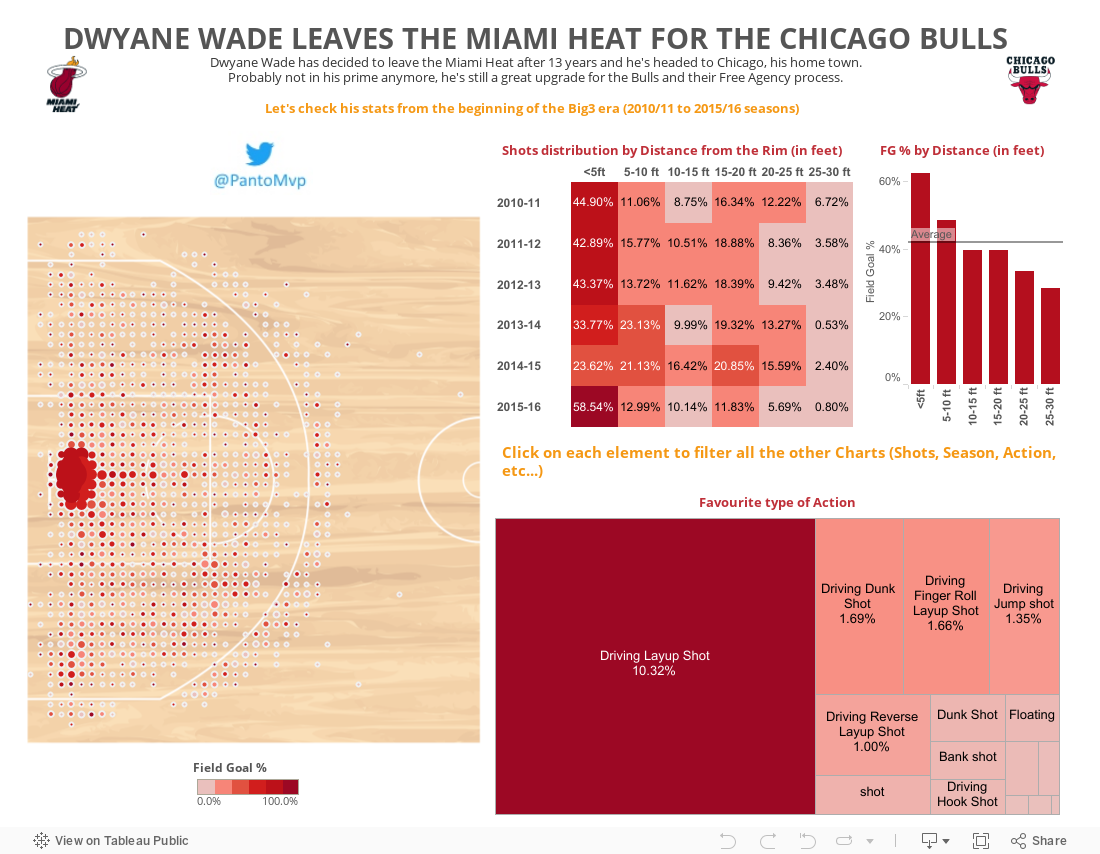
This summer, Dwyane Wade decided to leave Miami after 13 years with the Heat in order to play for the Chicago Bulls, his hometown team.


Despite not being in his prime anymore, he can bring his championship experience and veteran leadership to the Windy City.


Since the arrival of LeBron James in Miami, Wade had to to adjust his game to be the second offensive option and probably he will have to do the same in Chicago, sharing the ball with rising star Jimmy Butler.


Check his number starting from the Big3 era.


Every visualization in the dashboard is connected, so you can filter across data: for example you can start clicking one spot on the map to see just its details in the right charts.


giovedì 20 ottobre 2016

Jordan & James: 2 Numbers 23, but the magic number is 25

Disclaimer: I don't want to create any sort of flame because there's already plenty of it on the web!


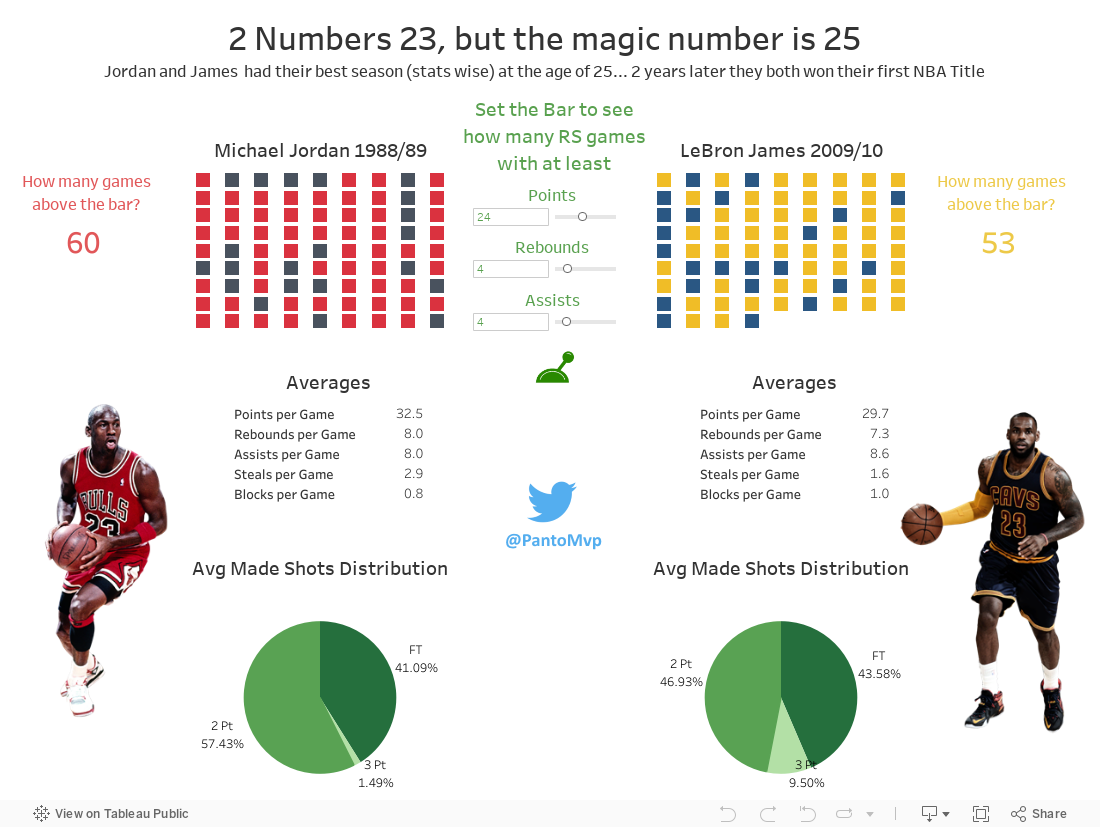
Waiting for the start of the NBA season, I was taking a look to some Micheal Jordan stats when I realized that his best statistical season could have been the 1988/89.
Back then, he was 25.
Thinking about his Airness, and his 23 jersey number, I was wondering:
"Hey, what about LeBron James best season?"

For some reasons, LBJ 2009/10 season was his best one in terms of stats.
Guess how old he was?
Correct: 25!

Funny fact, both Jordan and James won their very first NBA title 2 years after their best season (stats wise)
23 + 2 = 25 (for many reasons)

Analysis

In the following dashboard, I've tried to compare their Regular Season games setting 3 parametric bars that you can use and modify to see how many games Jordan and James finished with at leat X Points, Y Rebounds and Z Assists.
The color of that game will be lighter then the others (red for Jordan, yellow for James).


Have fun with it!

By the way, you could notice how different was their made shots distribution: Jordan barely scored 0,3 3Point field goal per game (James 1,7), probably as a consequence of his slashing style back in his prime with 11,6 2Point field goal made (James 8,4).


PS: Here's a quick Version of the dashboard for Mobile Phones:
https://public.tableau.com/profile/fabio.fantoni#!/vizhome/MJLBJ-232isthemagicnumber/MJvsLBJ


mercoledì 19 ottobre 2016

Ten Years of Nba Draft

Scatter Plots: a brief Introduction

When you have to deal with a dataset containing lots of rows and multiple metrics, Scatter Plots may be the solution to all your Viz problems.

With a Scatter Plot chart, you can plot all your rows/detail considering a minimum of 2 metrics (X and Y coordinates) till a maximum of 4.

You may say: what could the other 2 metrics affect?
I shoud say: Size of your "plotted" shape, and eventually its color.


For example you shuold plot multiple circle (one for each row of yours) with a specific size determined by a third metric, and a certain color coming from a fourth metric (eg: gradient from worst to best).
Alternately, you could even bind colors to a dimensions.


Analysis

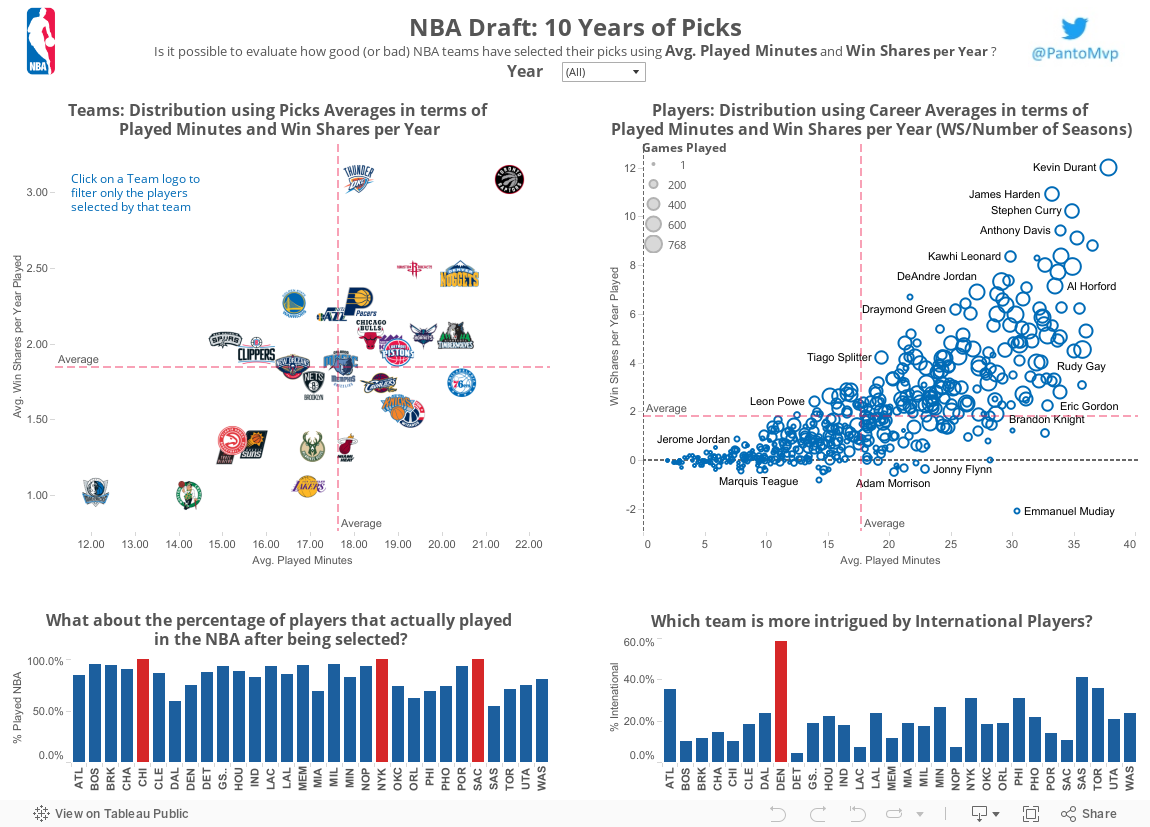
Is it possible to evaluate how good (or bad) NBA teams have selected their picks in the last 10 years?

I tried to answer this question using 2 very well known stats: Avg. Minutes Played and Wins Share per Year of every player drafted in this span of time.


With this assumption, the more a team (first scatter plot) or a player (second scatter plot) is on the top-right corner the more they are considered in a good position with high value for Avg. minutes played and hig Wins Share per Year.
On the other end, being in the bottom-left corner means that a team has selected low profile/impact players; meanwhile for a player means that his careers is just sub-par.


You can interact with the dashboard both selecting a year to filter a specific draft class and clicking on teams logo to consider just those players drafted by that team.


Filters and Table Calculation: Tips for Tableau beginners

When you start using Tableau, dragging and dropping stuff, you see rainbows and unicorns everywhere.

It's definetly my favourite DataViz tool ever.

But after a while, when you begin to elevate your game, you may find some difficulties if you don't spend some time understanding how Tableau works, even with simple tasks.

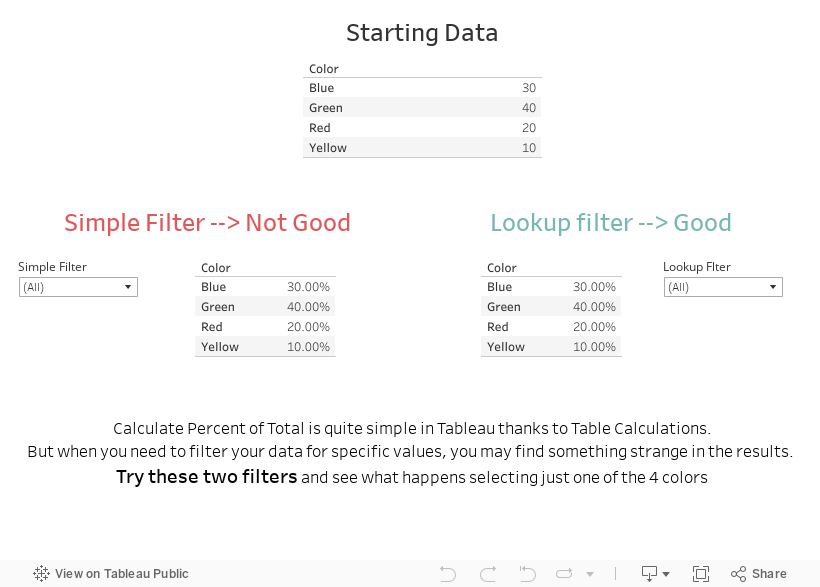
I remember my first impasse when I had to calculate percent of total while filtering the same dimension, with a sample data like this:

Color     Value
Blue       30
Red        20
Green     40
Yellow   10

After having added Table Calculation on Value using "Percent of Total" I simply added Color on the filter shelf and selecting Green I thought I would have got 40%.
Surprisngly (for me back then, not now), I got 100%.

Why? I couldn't undesrtand how it could happen.

So I started spending some time studying Tableau and I realized of it works in terms of order of operations.


Since Percent of Total is a Table Calculation, it is executed after dimension filters (eg: selecting one of the 4 colors).
So my table calculation was working on pre-filtered data with just a color selected and 100% value was correct (40 out of 40).

To by-pass this, you just need to create a Calculated Field using a Table Calculation based on the dimension you want to filter.
With this little trick, your filter will be executed after the Percent of Total Calculus and selecting Green you'll get the 40% I was looking for back then.

If you don't trust my words (you erethic!), take a look at this simple dashboard I realized just for you.


At the end of the day, my suggestion is to study how Tableau works from the early beginning because you will save time doing you vizzes and you'll understand how powerful it could be.